How to print just the recipe (no ads, no life story)
Most of a recipe page isn't the recipe. Every way to print or save just the part you cook from, side by side, including a recipe view that skips the story entirely.
You wanted the ingredients. What you got was a cookie banner, a newsletter pop-up, a video that plays itself and nine paragraphs about a rainy weekend in Vermont, with the recipe somewhere under all of it. Hit print on that page and you get five sheets, most of them ads, with the recipe split across two of them.
There's a better way to print just the recipe. PrintFriendly drops the ads and the clutter, and on a lot of recipe pages it skips the story too, so what you print or save is the ingredients and the steps.
First, look for the recipe's own Print button
Most recipe blogs put a Print Recipe button on the recipe card, the box near the bottom with the ingredients and instructions in it. A Jump to Recipe link at the top of the page usually takes you straight there. When the button is there and it works, use it. It's the quickest route, and it prints what the site's cook decided a printout should hold.
It's often not enough, though. Plenty of sites don't have one. Some print the card with a full-page photo above it, or with the ads still attached. Some open a print page that's broken or blank.
Print just the recipe with PrintFriendly
Install the PrintFriendly extension, open the recipe, click the PrintFriendly button in your toolbar and choose PrintFriendly View. It opens over the page with the ads, menus and sidebar already gone.
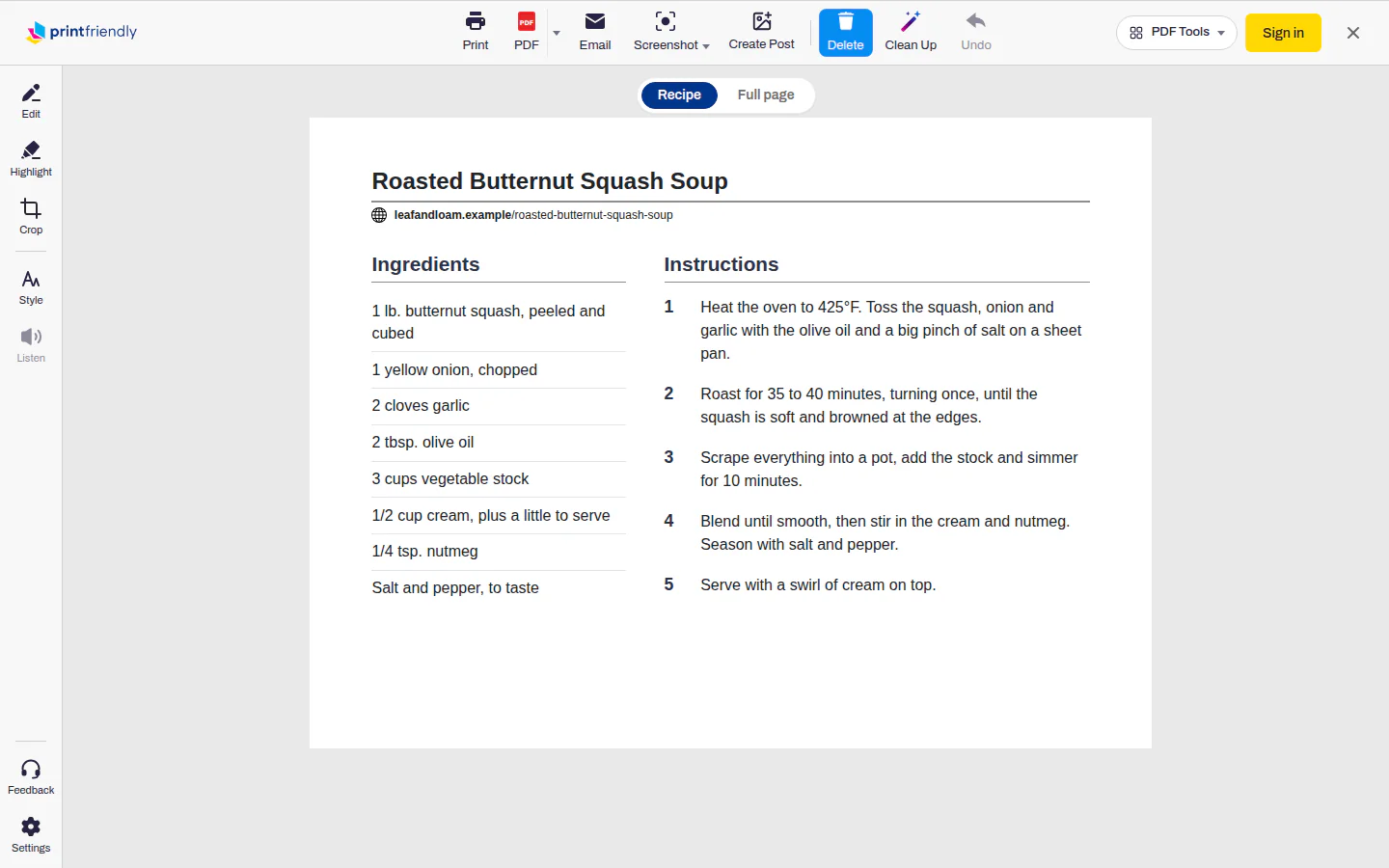
On many recipe pages it opens straight on the recipe itself. Up top is whatever the site lists of the photo, the author, servings and times. Below that, the ingredients sit in a column beside the numbered steps, with any notes and nutrition after. The story and the comments aren't in it at all.
Above the page there's a Recipe / Full page switch. Recipe is the short version. Full page shows the whole article, cleaned up, story and all, for when the cook's tips are buried in paragraph six. The switch only applies to that page, so the next recipe opens on its own best view, and the switch itself never prints.
Anything you still don't want, click. Hover over a block and a Click to delete label appears. One click removes it: a paragraph of the story, the "Rate this recipe" box, or in the recipe view a single ingredient line or the nutrition. Went one too far? Undo puts it back.
Then click Print to send it to the printer, or PDF to save it.
No extension? Paste the recipe's address into the box on our home page and press Go. You get the cleaned-up article (the recipe view is only in the extension), with Print and PDF along the top. Click Delete there to start removing blocks, and Undo if you overdo it.
The extension works in Chrome, Edge, Firefox and Safari.
Make the printout easier to cook from
A few things worth doing before you hit Print, all in PrintFriendly View:
- Bigger type. Open Style and turn up Text size. You'll be reading this from the counter with flour on your hands, and 120% is a lot kinder.
- A smaller photo, or none. In the same Style menu, Image size shrinks every picture on the page to 75%, 50% or 25%, and 0% drops them altogether. If you'd rather keep the hero shot and lose the rest, click the ones you don't want instead. A photo deletes like any other block.
- One page instead of two. Delete the nutrition box, the comments and the "you might also like" links. That's often the difference between one sheet and two.
Save it as a PDF instead
Cooking from a tablet, or building a collection? Click PDF instead of Print and you get a file of just the recipe, with the same cleanup. A folder of those is a cookbook with no ads in it, and it's still there if the site ever takes the page down.
The old way: print a selection
If you'd rather not install anything or use our site, your browser can do a rough version. Highlight the recipe with your mouse, from the title down to the last step, then press Ctrl+P (Command+P on a Mac). Some browsers then offer to print only what you selected. Pick that and the highlighted part is all that prints.
It's hit and miss. Dragging a selection across a page full of ads and buttons tends to pick them up, and when the ingredients sit in their own box beside the steps, the selection can skip them entirely. The other old trick, pasting the recipe into a plain text editor like Notepad and printing from there, gets rid of the photos but takes the headings, bullets and numbering with them, so you'll spend a minute tidying before it reads like a recipe.
Why some recipes printed wrong, and what we fixed
Two things used to go wrong often enough that we fixed them.
On some sites the printout had the steps but no ingredients. The site kept the ingredients in their own box beside the instructions, and we were treating that box like a sidebar and leaving it out. Now we go back for it.
On others the amounts came apart from the ingredients: "1" on one line, "lb. butternut squash" on the next. Those sites lay the list out as two columns and rely on their own styling to pair them up. We now join each amount back onto its ingredient, so you get "1 lb. butternut squash" the way the cook wrote it.
Both fixes are in the extension's Full page view and on printfriendly.com.
Everything else PrintFriendly View can do, from editing the text to cropping the page, is on the Help Center's extension features page.
Frequently Asked Questions
How do I print a recipe without all the ads?
Open the recipe, click the PrintFriendly button and choose PrintFriendly View. The ads and menus are already gone, and on many recipe pages so is the story. Click anything else you don't want, then hit Print. No extension? Paste the recipe's address into the box on the PrintFriendly home page and press Go.
How do I just get the recipe from a website?
In the PrintFriendly extension, many recipe pages open on just the recipe: ingredients beside numbered steps, then any notes. A Recipe / Full page switch above the page flips between that and the whole article. Click anything left that you don't want to delete it, and Undo brings it back.
Why can't I print a recipe from the internet?
Usually it's the page, not your printer. Some recipe sites have no print button, and some have one that opens a broken print page. Printing the page as-is copies everything on it, ads included. PrintFriendly View strips the page down to the recipe so it prints like one.
Can I save a recipe as a PDF instead of printing it?
Yes. In PrintFriendly View, click PDF instead of Print and you get a file of just the recipe. The PDF button is on printfriendly.com too, once you've pasted in the recipe's address.