The best way to print a recipe from a website
Sometimes the recipe's own Print button is all you need, and sometimes it isn't. Six ways to get a recipe onto paper, what each is good and bad at, and which to pick.
You want one page: the ingredients and the steps. What the printer hands you is six pages of cookie banner, video, ads and a story about somebody's grandmother, with the ingredients on page four. The best way to print a recipe from a website depends on the site. Sometimes its own Print Recipe button is all you need, and sometimes it isn't. Here's what each way gets you, so you can pick.

Why a recipe page prints so long
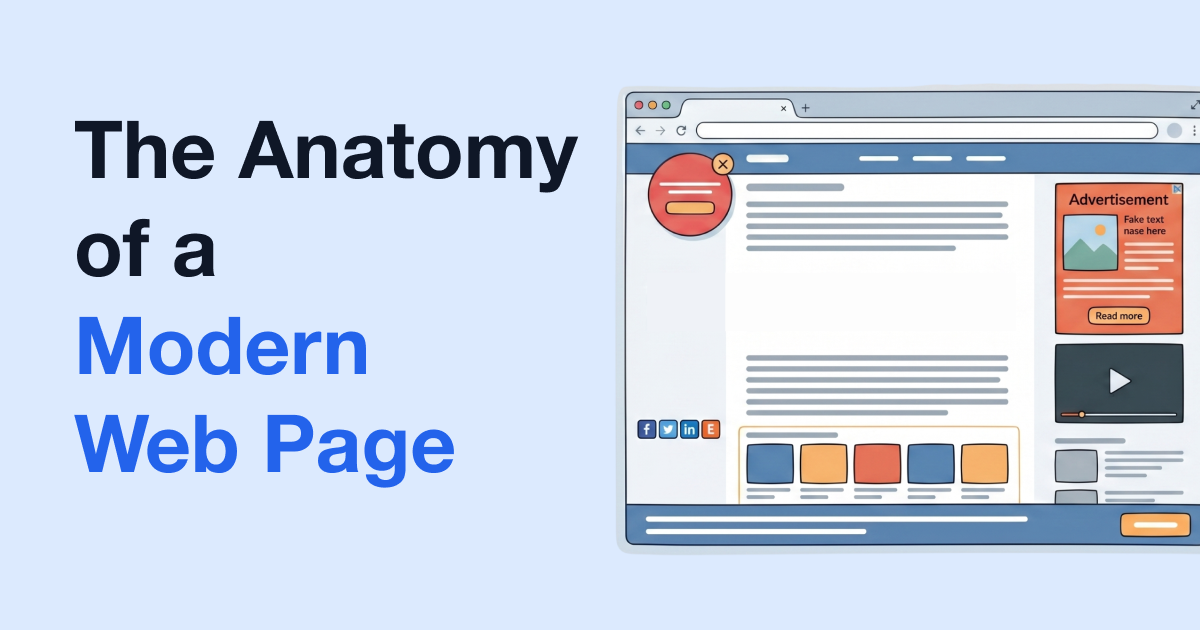
Press Ctrl+P (Command+P on a Mac) and your browser prints the page the way it was built: the story, every photo, the comments, the ads and the "you might also like" links. The recipe itself is usually in a box further down, the recipe card, with the ingredients and steps in it.
Sites can also describe the recipe in a standard format that search engines read: Google's guide to recipe structured data says details like cooking times and nutrition help it understand the recipe and show it in search. That card is why some ways of printing work beautifully on one site and fall apart on the next.
The site's own Print Recipe button
Most recipe blogs put a Print Recipe button on the recipe card, and a Jump to Recipe link at the top gets you there.
What it's good at:
- Nothing to install. It's right there on the page.
- It's the cook's own layout: what they decided a printout should hold, often on one clean page.
- You stay on their site to do it.
What it's bad at:
- Not every site has one.
- Some print a full-page photo first, or bring the ads along, or open a print page that's broken or blank.
- Every site's printout looks different, which matters if you're filling a binder.
- You can't take out a line you don't want.
When it's there and it works, use it. It's the quickest way, and nothing else on this list beats the cook's own version of their recipe.
Printing the whole page
The baseline. Everything on the page prints, ads and comments included, and it's the hardest on paper and ink. For a page with no clutter it's fine, and we compared it with the other general options in the best way to print a web page.
Your browser's reader view, then print
Most browsers have a stripped-down view for reading. Apple says Safari's Reader hides ads, navigation menus and other distracting items. Mozilla's page on Firefox Reader View says it strips away buttons, ads, background images and videos. Chrome has a Reading mode that sits in the side panel, next to the page.
What it's good at: it's free and already in your browser, and the ads and menus go. In Safari or Firefox, print while the reader view is showing and that's what you get on paper.
What it's bad at: it's made for articles, not recipes. You usually get the whole story along with the recipe, the ingredient box can come out looking different from the card, and on some recipe pages the browser doesn't offer it at all. You can't pick out the bits you don't want. For a recipe that's just a plain blog post, it does fine.
Copy it into a document
Highlight the recipe and print just the selection (some browsers offer that in the print dialog), or paste it into Word or Google Docs and tidy it up there.
What it's good at: complete control. You choose the font, fix the wording, add your own notes, and every recipe in your binder looks the same.
What it's bad at: it's slow. A selection dragged across the page tends to pick up ads and buttons, and it can miss an ingredient list that sits in its own box beside the steps. Pasting into a plain text editor drops the photos, and the formatting with them.
That's fine for the recipe you'll keep for the rest of your life. It's a lot of work for Tuesday's dinner.
Tools that strip the ads and story first
Recipe extractor sites and apps. Paste a link, or share it from your phone, and you get the recipe on its own in the tool's layout. They're made for cooking from a screen: a recipe collection, sometimes a servings scaler, a view that's easy to follow on a phone. They're built around the recipe card, so they do best on sites that have one, and what you get is their layout, not the cook's.
PrintFriendly. Open the recipe, click the PrintFriendly button in your toolbar and choose PrintFriendly View, using the PrintFriendly extension for Chrome, Edge, Firefox or Safari. On many recipe pages it opens on just the recipe: the ingredients beside the numbered steps, then any notes and nutrition, with no story, ads or menus. A Recipe / Full page switch above the page flips to the whole article, cleaned up, when the cook's tips are in the story.
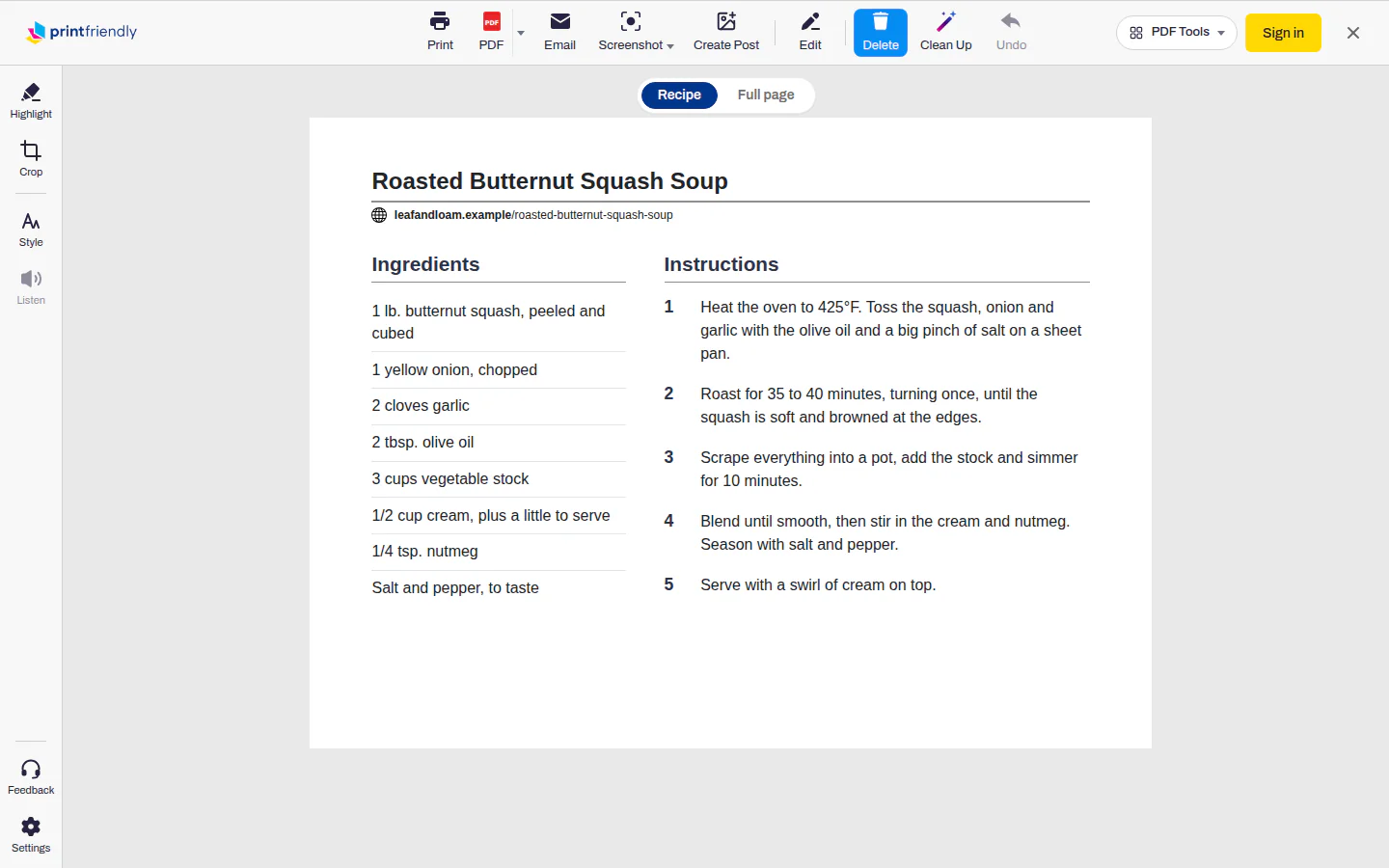
Anything left you don't want, click it and it's gone, one block at a time: a paragraph, a photo, a single ingredient line. Undo brings it back. Under Style, Text size makes the type bigger for reading at the counter, and Image size shrinks every photo, or drops them all at 0%. Then Print, or PDF for a file. No extension? Paste the recipe's link into the box on our home page and press Go. You get the cleaned-up article there, not the recipe view.
Where it isn't the right pick: it's for printing and saving. It doesn't scale servings, keep a recipe box or give you a cooking view on your phone, and it doesn't keep the site's look. The full steps are in how to print just the recipe.
Side by side
| Site's Print Recipe button | Whole page | Reader view | Copy into a doc | Recipe extractor app | PrintFriendly | |
|---|---|---|---|---|---|---|
| What you need | Nothing | Nothing | Nothing | A word processor | A site or an app | The extension, or a link pasted on our home page |
| Ads | Depends on the site | Printed | Gone | Whatever you copied | Gone | Gone |
| The story | Gone | Printed | Usually kept | Whatever you copied | Gone | Gone in the recipe view; click it away in Full page |
| Works on | Sites with a button | Any page | Pages it reads as articles | Any page | Sites whose recipe card it can read | Most pages |
| Choose what prints | Only what the site offers | Page ranges | Page ranges | Yes, edit anything | Depends on the tool | Yes, block by block, with Undo |
| Drop photos to save ink | Only if the site offers it | No | No | Yes, by hand | Depends on the tool | Yes, all at once or one at a time |
| Looks like the site | Yes, the cook's layout | Yes | No | Your layout | The tool's layout | No |
| Save as a PDF | Through the print dialog | Through the print dialog | Through the print dialog | Yes | Depends on the tool | Yes, the PDF button |
| Time it takes | Seconds | Seconds | Seconds | Minutes | Seconds | Seconds, plus any clicks to delete |
Which to use when
- The site has a Print Recipe button and it prints a clean page: use it.
- No button, or it prints the photo, the ads or six pages: PrintFriendly. Delete what's left and shrink or drop the photos to save paper.
- You can't install anything: a reader view in Safari or Firefox, or paste the link on PrintFriendly's home page.
- You cook from your phone, want to scale servings or keep a recipe library in an app: a recipe extractor app fits that better than any printout.
- The one recipe you'll keep for life, laid out your way: copy it into a document and make it yours.
- You want a file, not paper: PDF in PrintFriendly, or Save as PDF from your browser's print dialog after the site's button.
Frequently Asked Questions
How do I print a recipe without the ads?
Try the site's own Print Recipe button first, on the recipe card. If there isn't one, or it prints a mess, open the page in PrintFriendly View, where the ads and menus are already gone, or use your browser's reader view.
Is the Print Recipe button on recipe sites enough?
Often, yes. When it prints one clean page of ingredients and steps, you're done. It falls short when a site doesn't have one, or when it prints a big photo, the ads or a blank page.
How do I print a recipe on one page?
Get rid of everything that isn't the recipe: the story, the comments, the nutrition box. In PrintFriendly View you click those away, and Image size under Style shrinks the photos or drops them altogether.
Do I need an extension to print a recipe without the ads?
No. The site's own button, your browser's reader view or the link box on PrintFriendly's home page all work without one. The extension adds a view that opens on just the recipe on many recipe pages.
Sources
- Recipe Schema Markup | Google Search Central, Google Search Central. Recipe sites can mark up a recipe's ingredients and steps with schema.org's Recipe structured data, which Google uses for recipe results.
- Hide ads and distractions in Safari on iPod touch, Apple. Safari's Reader shows a web page's article without ads and other distractions.
- Firefox Reader View for clutter-free web pages - Mozilla Support, Mozilla. Firefox's Reader View strips a web page down to its text and images for clutter-free reading.
- Use Reading mode in the Side panel - Google Chrome Help, Google. Chrome has a Reading mode that shows a simplified version of a page in the side panel.